
A Streamlit application that translates natural-language questions into SQL and runs them against a sample employee database. It combines Groq's hosted GPT-OSS 120B model with LangChain, SQLite, and a focused browser interface.



Watch a walkthrough of the Text-to-SQL workflow and application interface:
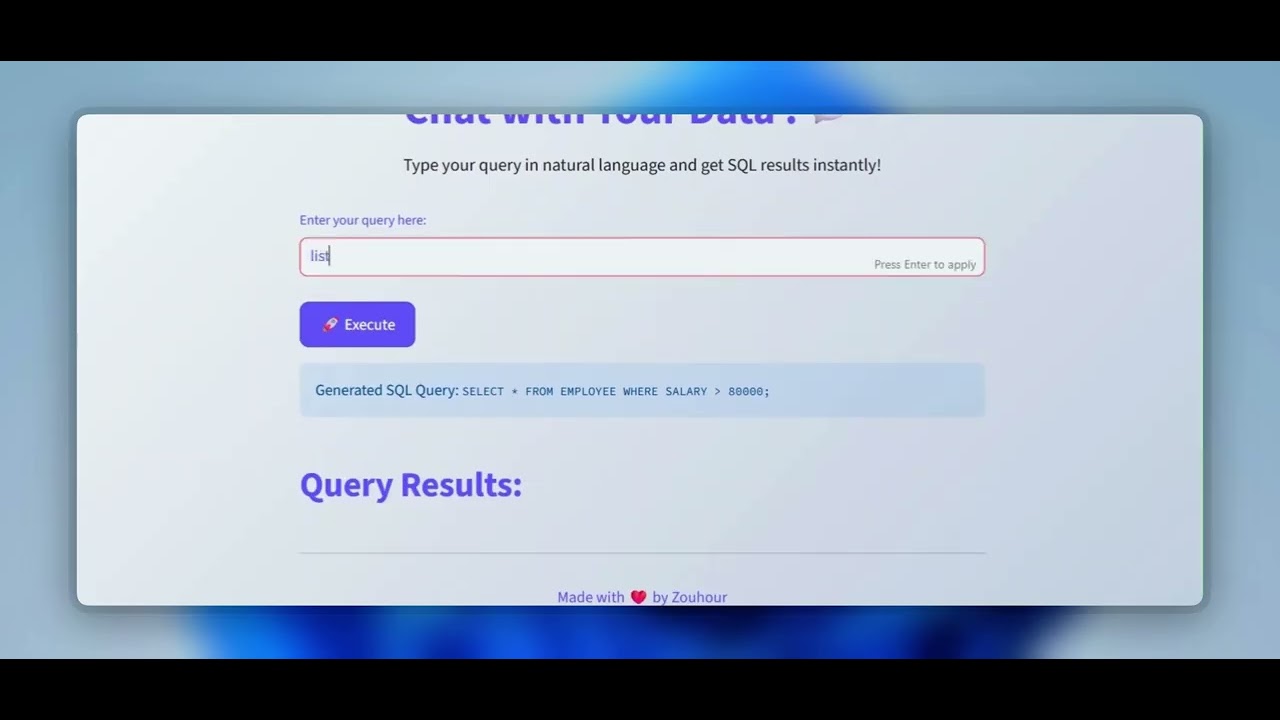
SQL can be a barrier for people who need quick answers from structured data. This project demonstrates a simple Text-to-SQL workflow: a user asks a question in English, the language model generates a query for a known schema, and the application returns the matching database rows.
- Converts English questions into SQLite queries.
- Uses the
EMPLOYEEschema as context for SQL generation. - Executes generated queries against the included
company.dbdatabase. - Displays both the generated SQL and returned rows.
- Reads credentials from environment variables or Streamlit secrets.
- Provides a responsive Streamlit interface with clear error feedback.
flowchart LR
    A[User question] --> B[Streamlit interface]
    B --> C[LangChain prompt]
    C --> D[Groq: GPT-OSS 120B]
    D --> E[Generated SQL]
    E --> F[(SQLite company.db)]
    F --> G[Results in Streamlit]
- The user enters a question in
app.py. - A prompt supplies the
EMPLOYEEtable schema and example queries. - Groq's
openai/gpt-oss-120bmodel returns SQL through LangChain's string parser. - Python's built-in
sqlite3module executes the SQL againstcompany.db. - Streamlit shows the generated query and result rows.
| Technology | Role |
|---|---|
| Python | Application and database logic |
| Streamlit | Interactive web interface |
| LangChain Core | Prompt composition and output parsing |
| LangChain Groq | Groq chat-model integration |
| Groq API | GPT-OSS 120B model inference |
| SQLite | Local sample employee database |
| python-dotenv | Local environment-variable loading |
The application queries the EMPLOYEE table in company.db.
| Column | SQLite type | Description |
|---|---|---|
EMP_ID |
INT |
Employee identifier |
NAME |
VARCHAR(25) |
Employee name |
DEPARTMENT |
VARCHAR(25) |
Department name |
POSITION |
VARCHAR(25) |
Job title |
SALARY |
INT |
Salary value |
BONUS |
INT |
Bonus value |
text-to-sql-streamlit/
├── app.py              # Streamlit entry point and Text-to-SQL pipeline
├── company.db          # Employee database used by the application
├── mydata.py           # Script that creates and populates company.db
├── database.py         # Separate student-database example
├── student.db          # Database created by database.py
├── Screenshot .png     # Application preview
├── requirements.txt    # Pinned runtime dependencies
├── LICENSE             # Proprietary license
└── README.md
Requirements: Python 3.11 or newer and a Groq API key.
git clone https://github.com/zouhour13/text-to-sql-streamlit.git
cd text-to-sql-streamlit
python -m venv .venv
Activate the environment on Windows:
.venv\Scripts\Activate.ps1Or on macOS/Linux:
source .venv/bin/activateInstall the dependencies:
python -m pip install -r requirements.txtFor local development, create a .env file in the project root:
GROQ_API_KEY=your_groq_api_keyThe .env file and .streamlit/secrets.toml are ignored by Git. Never commit the real key.
streamlit run app.pyOpen the local URL printed by Streamlit, normally http://localhost:8501.
Ask:
List all employees working in the IT department
The model is prompted to produce a query such as:
SELECT * FROM EMPLOYEE WHERE DEPARTMENT = "IT";The generated SQL and matching rows are then displayed in the application.
-
Push this repository to GitHub.
-
Sign in to Streamlit Community Cloud.
-
Create an app with repository
zouhour13/text-to-sql-streamlit, branchmain, and entry pointapp.py. -
In Advanced settings → Secrets, add:
GROQ_API_KEY = "your_groq_api_key"
-
Deploy the app and review its logs for dependency or startup errors.
- The prompt is designed only for the included
EMPLOYEEtable. - SQL generation depends on an external model and may occasionally produce invalid queries.
- Generated SQL is executed directly against the bundled SQLite database; this demonstration should not be connected to sensitive or production data without query validation and read-only database controls.
- The interface displays raw result tuples rather than a typed, paginated data table.
- A valid Groq API key and network access are required for query generation.
- Validate generated statements and allow only read-only queries.
- Derive prompt context automatically from the database schema.
- Add automated tests for SQL execution and error handling.
- Display results in a labeled dataframe and support CSV export.
- Add conversation history and example prompts.

Zouhour Bellamine
AI & Data Engineer · Tunis, Tunisia
Copyright © 2026 Zouhour Bellamine. All rights reserved.
This repository is publicly available for viewing and recruitment/educational evaluation purposes. No permission is granted to copy, fork, modify, redistribute, publish, or commercially use the source code without prior written permission from the copyright holder.